Qwen3.6 Plus Preview: The Free Flagship AI Model That's Quietly Taking Over OpenClaw
By Garfield Lawrence | OpenClaw Skill Packs | March 31, 2026
TL;DR
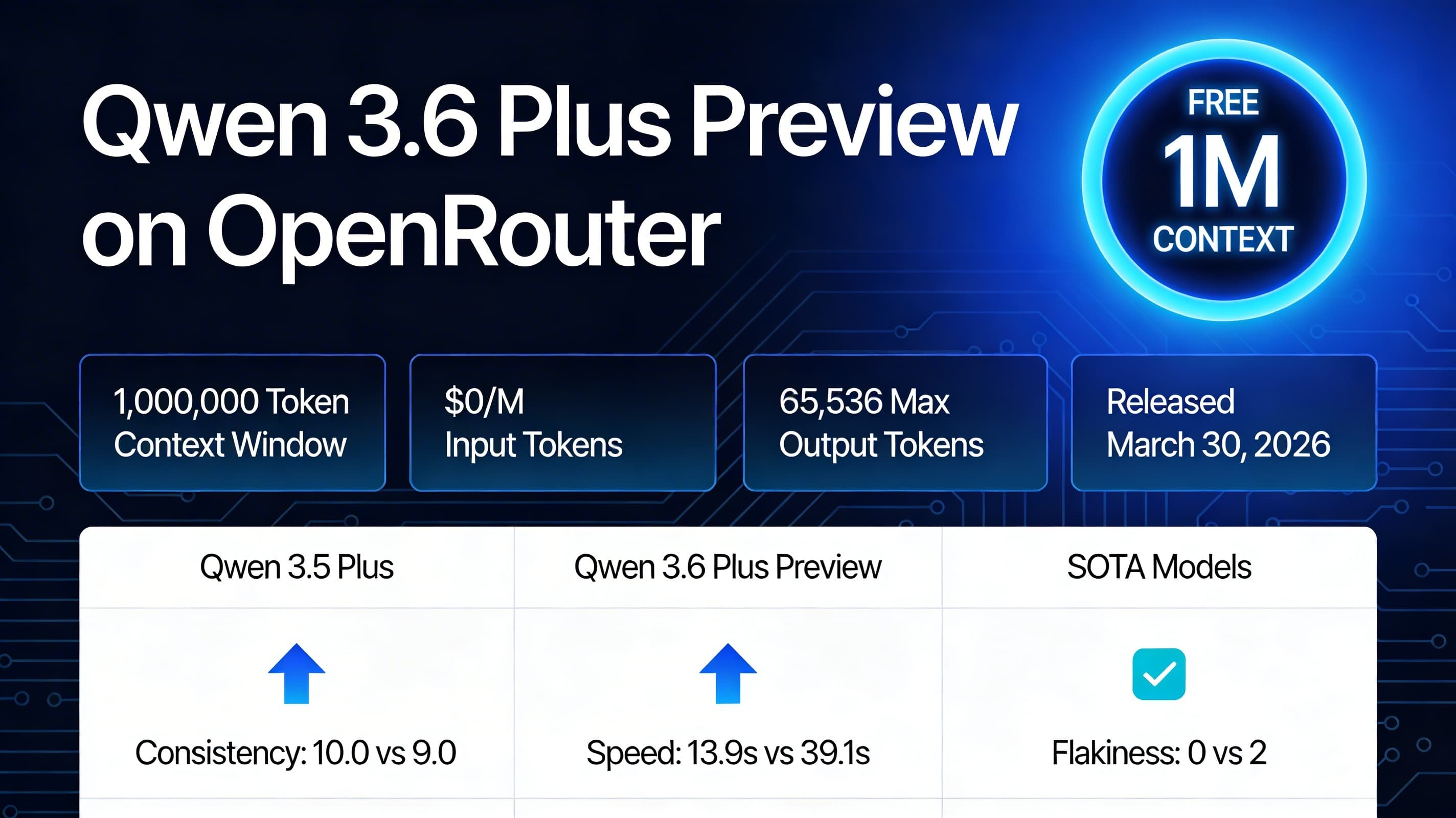
- →Qwen3.6 Plus Preview is a free flagship model on OpenRouter with a 1M-token context window.
- →Hybrid MoE architecture delivers faster, more stable agentic behavior than Qwen 3.5 — 10.0 consistency score vs 9.0, zero flaky runs.
- →Perfect fit for OpenClaw coding agents while the preview remains free. Set model ID to qwen/qwen3.6-plus-preview:free and run.
What Is Qwen3.6 Plus Preview?
Qwen3.6 Plus Preview is a large language model released on March 30, 2026 by Alibaba's Qwen team. It's available on OpenRouter under the model ID qwen/qwen3.6-plus-preview:free — completely free during its preview period. It belongs to the Qwen Plus Series and represents the next generation of the Qwen3 lineage.
The model features a hybrid Mixture-of-Experts (MoE) architecture with a 1,000,000-token context window — large enough to fit entire codebases, agent logs, and long document chains in a single prompt. Max output is 65,536 tokens, making it viable for both short responses and long-form generation tasks.
During the preview, input and output are both $0.00 per million tokens. This makes it an unusually powerful option for teams running high-volume agentic workflows where API costs are a constraint. The catch: prompts are logged for model improvement during the preview period — more on that in the privacy section.
Technical Specifications
Qwen3.6 Plus is a hybrid MoE flagship preview model. The specs below are sourced from OpenRouter, Puter, and the Qwen3 model lineage documentation.
| Specification | Value |
|---|---|
| Model ID (OpenRouter) | qwen/qwen3.6-plus-preview:free |
| Release Date | March 30, 2026 |
| Model Family | Qwen Plus Series (Qwen3.6 generation) |
| Architecture Type | Hybrid MoE (Mixture-of-Experts) |
| Context Window | 1,000,000 tokens |
| Max Output Tokens | 65,536 tokens |
| Modality | Text-only |
| Tool / Function Calling | Supported |
| Input Cost | $0.00 / 1M tokens (preview) |
| Output Cost | $0.00 / 1M tokens (preview) |
Benchmarks & Real-World Performance
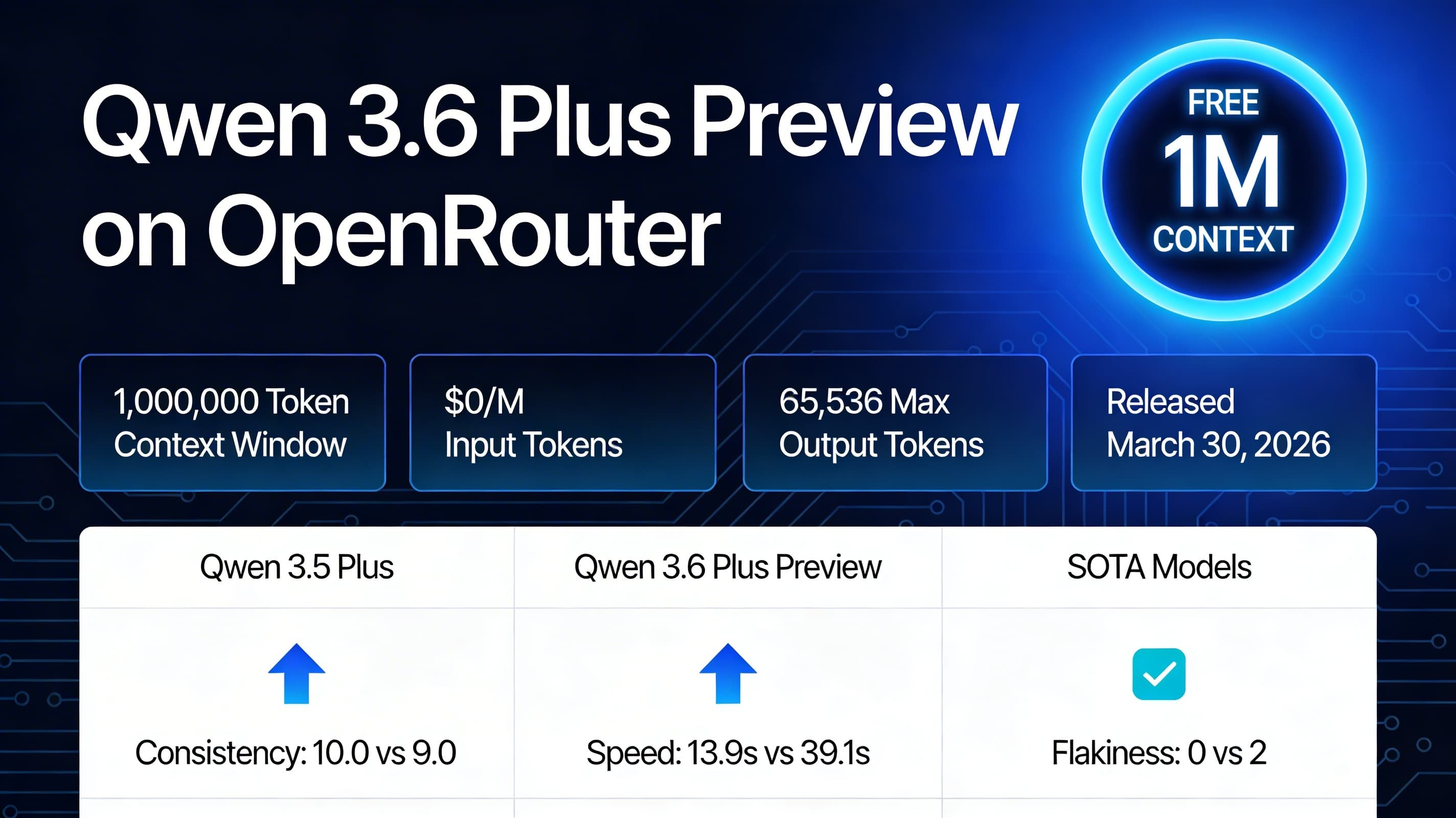
Early benchmark results from Qubrid and community testing show Qwen3.6 Plus outperforming both Qwen3.5 Plus and GLM 5 Turbo on consistency and speed — the two metrics that matter most for agentic workflows where tasks must complete reliably without retries.
| Metric | Qwen3.6 Plus | Qwen3.5 Plus | GLM 5 Turbo |
|---|---|---|---|
| Consistency Score | 10.0 | 9.0 | 7.9 |
| Flaky Test Runs | 0 | 2 | 5 |
| Avg. Response Time | ~13.9s | ~39.1s | ~17.9s |
The consistency score of 10.0 with zero flaky runs is the standout number. In multi-step agent workflows, a flaky model that fails 1-in-5 runs forces retries, burns tokens, and breaks pipelines. Qwen3.6 Plus ran clean in every test, at nearly 3x the speed of its predecessor.
Why Qwen3.6 Plus Matters for OpenClaw
OpenClaw agents run multi-step workflows — scraping leads, writing emails, monitoring fleets, generating content. Every one of those workflows benefits from a faster, more reliable model. Here's why Qwen3.6 Plus is the current best free choice for OpenClaw users:
- ✓1M context window allows full codebases, agent logs, and long document chains in a single prompt — no chunking required.
- ✓Zero flaky runs means your pipelines complete on the first attempt, every time. No retry loops, no broken automations.
- ✓13.9s average response time cuts agent loop duration by ~65% vs Qwen3.5 — 10-step pipelines complete in minutes instead of hours.
- ✓Free preview pricing makes large-scale testing and production experimentation affordable before committing to paid tiers.
- ✓Native tool/function calling support means it works with OpenClaw's tool registry out of the box.
How to Use Qwen3.6 Plus Preview with OpenClaw
Setup takes under 5 minutes if you already have an OpenRouter API key. If not, create a free account at openrouter.ai first.
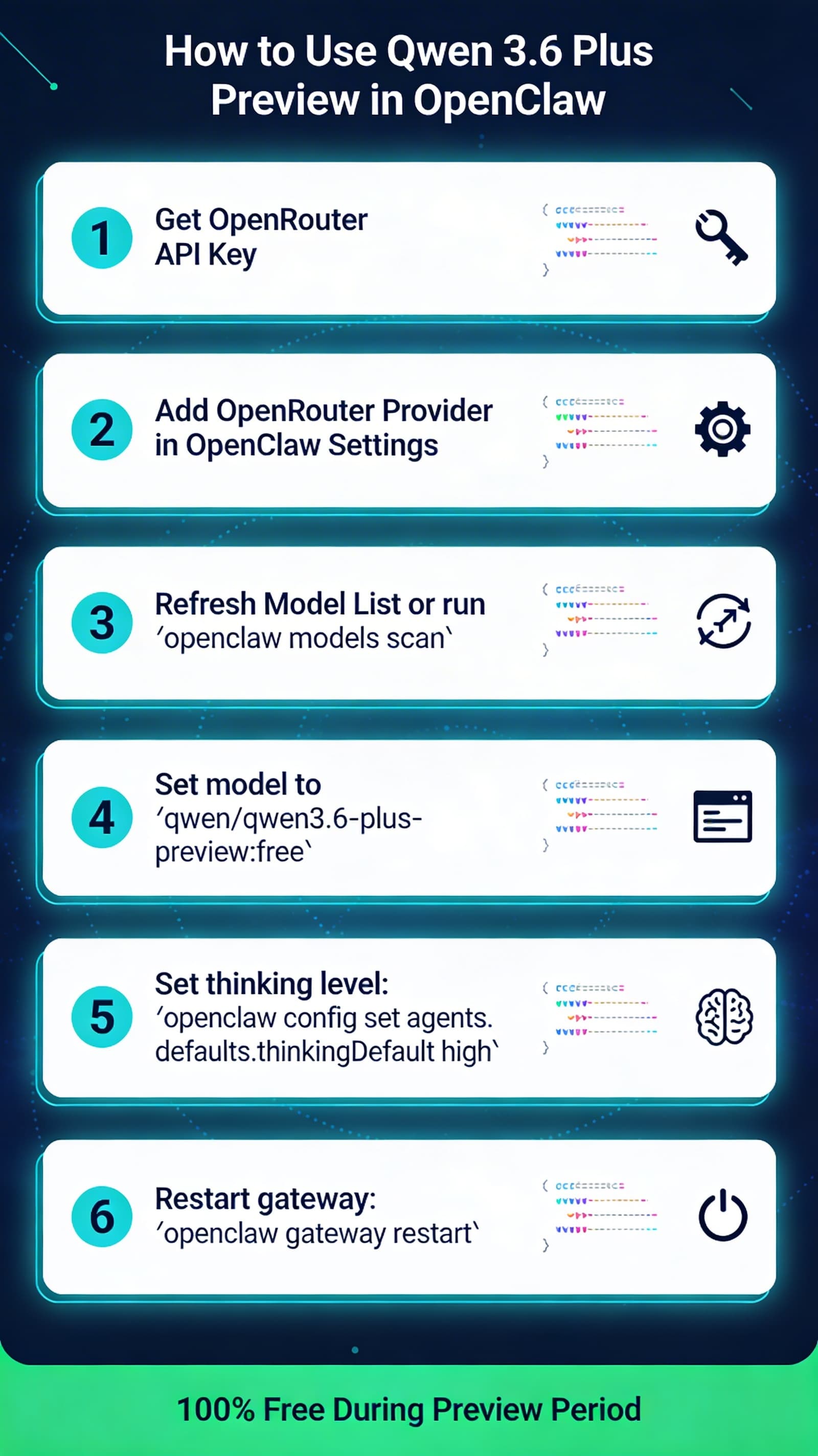
- 1Add your OpenRouter API key in OpenClaw settings (Settings → API Keys → OpenRouter).
- 2Run openclaw models scan to refresh the model list and pull in new releases.
- 3Set the model ID to qwen/qwen3.6-plus-preview:free in your agent or tool profile.
- 4Assign it to your target agent — coding agents, content agents, or fleet monitor.
- 5Test with a simple task: ask it to read a file and summarize it, or run a short agentic workflow.
- 6Benchmark it against your current default model. If it's faster and cleaner, switch permanently until the free preview ends.

The Preview Privacy Caveat
Your Data During Preview
Prompts and completions sent to Qwen3.6 Plus Preview are logged by Alibaba/Qwen to improve the model. Do not send sensitive business data, customer PII, proprietary code, or API keys while using the free preview tier.
Safe to use with Qwen3.6 Plus Preview: public information research, generic code tasks, content drafting with no proprietary info, and internal benchmarking with synthetic data. Not safe: customer records, contracts, source code with trade secrets, or anything you wouldn't post publicly. If your workflow involves sensitive data, route it through a paid private model (Claude, GPT-4o, or a self-hosted Ollama instance) and reserve Qwen3.6 Plus Preview for non-sensitive tasks.
How Qwen3.6 Plus Compares to Other Free Models
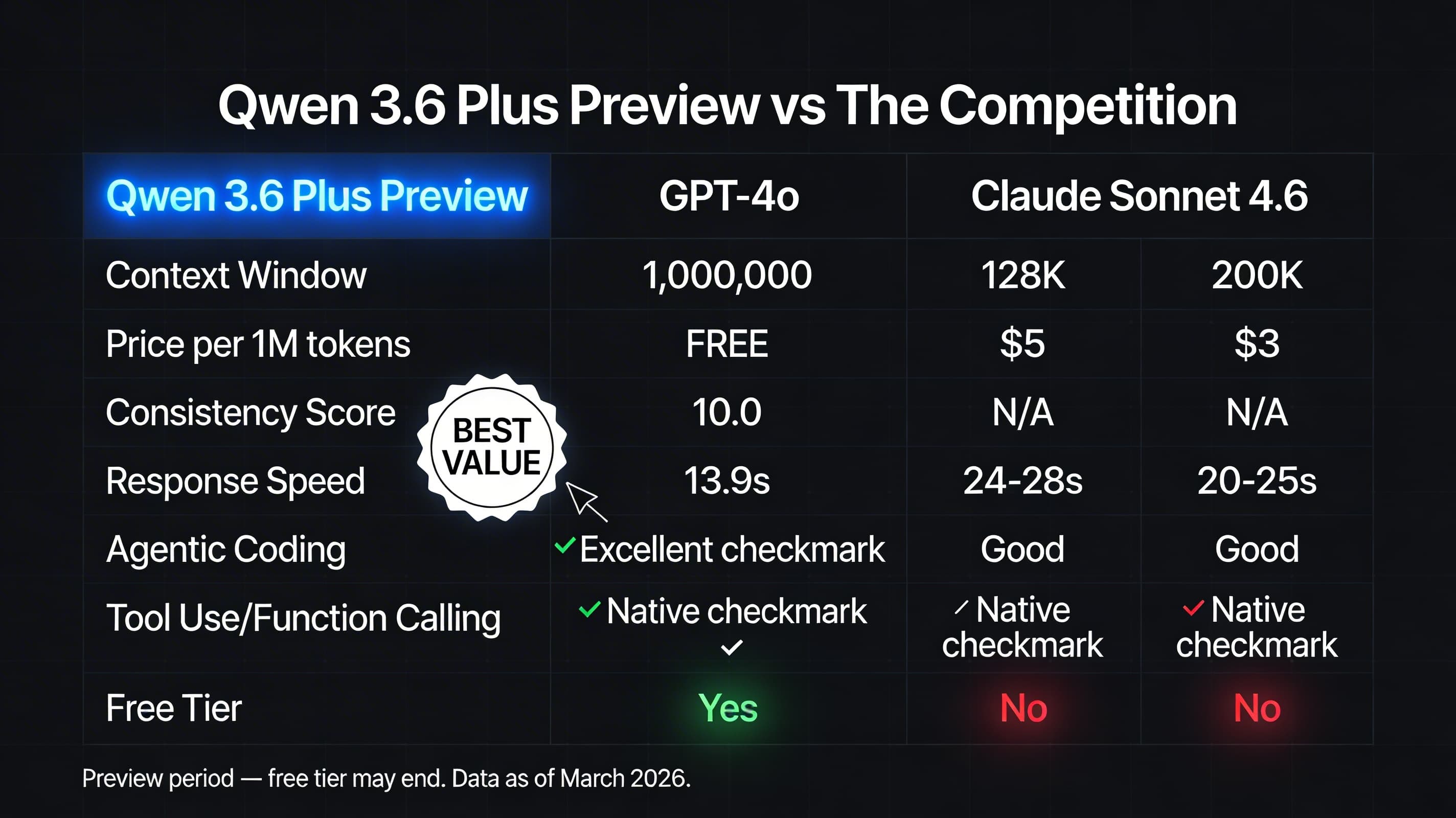
If you're running OpenClaw on a tight budget or testing new workflows, here's how Qwen3.6 Plus stacks up against the other commonly used free models:
| Model | Context | Speed | Agentic Reliability | Cost |
|---|---|---|---|---|
| Qwen3.6 Plus Preview | 1M tokens | Fast (~13.9s) | Very High (10.0) | Free (preview) |
| Qwen3.5 Plus | 262K–1M tokens | Slow (~39.1s) | High (9.0) | Paid |
| GLM 5 Turbo | 128K tokens | Medium (~17.9s) | Medium (7.9) | Free tier |
| Gemini Flash (free) | 1M tokens | Fast | High | Free (rate limited) |
Qwen3.6 Plus Preview is the only model in this table that combines a 1M context window, fast response time, and $0 cost with no rate limit restrictions during the preview window. That combination is temporary — take advantage of it now.
Frequently Asked Questions
Is Qwen3.6 Plus Preview multimodal?
No. This preview is text-only. If you need image or video understanding, use Qwen3-VL or a multimodal model via OpenRouter instead.
Can I use Qwen3.6 Plus Preview in production?
You can, with caveats. Prompts are logged during the preview period, so avoid sending sensitive or proprietary data. Check OpenRouter and Alibaba's current terms before deploying to production workloads with real customer data.
Does it support tool calling and function calling?
Yes. Qwen3.6 Plus Preview supports tool use and function calling, and integrates with OpenClaw's tool registry without any additional configuration.
How long will it stay free?
Unknown — free preview windows typically last weeks to months. Treat the free tier as temporary and plan to migrate to a paid tier or alternative once pricing is announced.
How do I set this as my default model in OpenClaw?
Go to Settings → Models → Default Model, and set it to qwen/qwen3.6-plus-preview:free. Or set it per-agent in the agent's SOUL.md under the model field.
Qwen3.6 Plus Preview is the best free model available for OpenClaw agents right now. A 1M context window, zero flaky runs, and sub-14-second response times at $0 is a combination that won't last. Add it to your OpenClaw setup today, benchmark it against your current model, and squeeze every productive hour out of the free preview before pricing kicks in.