OpenClaw kit
Turn one episode into seven days of marketing that pays.
Save six hours per episode and recover the revenue you lose when a show dies in 24 hours.
This page shows the job, the evidence, and the next step. Buy the DIY kit or ask us to set it up.

Kit preview
Podcast Summary Boost Kit
Demo Package Listed
Ready for customers to inspect and buy.
This product has a working demo or recorded workflow asset, a customer-ready delivery package, and checkout enabled after review.
27
Files
5
PDFs
0
DOCX
0
XLSX
- Episode summary
- Clip hook list
- Show notes
- Newsletter draft
Safety target
Target score before production: 85+ with clean source handling, human review, proof assets, rollback/failure handling, and no unsupported claims.
Episode growth agent
See one episode become summaries, clips, show notes, and promotion assets.
The demo path shows how a transcript turns into useful episode assets with accuracy review instead of generic content mush.
The money path
Watch the working agent first. If you want the files, buy the DIY kit for $297. If you want the result, have OpenClaw install the working agent around your real tools, routes, and approval rules.
Matched evidence video
Podcast Summary Boost Kit walkthrough
Watch what you get, what it helps you do, and how to start building it yourself.
Want this working in your business instead of another file pack? Use the install button and we build the agent path for you.
Agent for this kit
Podcast Repurposing Agent
We install transcript intake, brand voice, summary format, clip hooks, newsletter draft, and review workflow.
Step 1
Transcript comes in
The agent starts from one episode transcript or source recording notes.
Step 2
Assets get produced
Summary, show notes, hooks, clips, and promotion drafts are created.
Step 3
Accuracy gets checked
The install path adds review before anything is published.
The problem
You do not need more tools.You need one clear fix.
The solution
A plug-and-play repurposing system that turns one podcast episode into 20+ platform-ready assets—short-form clips, SEO show notes, email newsletters, and a 14-day social promotion calendar—to triple episode reach without hiring an editor.
Clear result
A plug-and-play repurposing system that turns one podcast episode into 20+ platform-ready assets—short-form clips, SEO show notes, email newsletters, and a 14-day social promotion calendar—to triple episode reach without hiring an editor.
Setup time
90-150 minutes self-serve; 2-5 business days with premium setup.
Exact output
INPUT: Episode 142 — “The Hidden Cost of Remote Work” (45 min interview). Key Moments: [03:12] “Burnout isn’t about hours worked—it’s about boundary erosion.” [14:45] “Ping anxiety” concept. [22:30] Buffer’s 4-day week case study. [31:00] The “shutdown ritual.” [38:15] “Hybrid is harder than fully remote.” OUTPUT: 30-Day Cross-Platform Content Calendar WEEK 1 — Hooks & Quotes Day 1: TikTok/Reels (15s) — Hook: “Burnout isn’t about hours…” quote over B-roll + waveform. Day 2: Tweet/X — Single quote graphic [03:12] with caption: “Boundary erosion > overtime.” Day 3: LinkedIn — Personal narrative on “ping anxiety” [14:45], tagging guest. Day 4: Instagram Carousel — “5 Remote Work Myths” (Slides 1–2). Day 5: YouTube Short — Audiogram of [14:45] with animated captions. Day 6: Facebook/Community — Poll: “Do you have a shutdown ritual?” [31:00]. Day 7: Pinterest — Infographic: “Boundary Erosion vs. Hours Worked” diagram. WEEK 2 — Education & Depth Day 8: TikTok/Reels (60s) — “3 signs you have ping anxiety” educational breakdown. Day 9: Tweet/X Thread — Part 2/5: Myths 2–3 from carousel + data snippets. Day 10: LinkedIn Newsletter — 800-word excerpt expanding on Buffer case study [22:30]. Day 11: Instagram Carousel — Slides 3–5/5 (myths 4–5 + CTA to full episode). Day 12: YouTube Short — “Why hybrid is harder than remote” [38:15] with disagree-bait caption. Day 13: Blog Post — SEO article: “What is Ping Anxiety? Causes & Fixes” (derived from [14:45]). Day 14: Email — Subject: “Sunday Scaries?” Linking to shutdown ritual tactic [31:00]. WEEK 3 — Engagement & Community Day 15: TikTok/Reels — Duet prompt: “Show me your shutdown ritual” using [31:00] clip. Day 16: Tweet/X — Contrarian graphic [38:15]: “Hybrid is harder than fully remote. Fight me.” Day 17: LinkedIn — Poll: “What drives your burnout? A) Hours B) Boundaries C) Both.” Day 18: Instagram Story — Quiz sticker: “True or False: Remote burnout = too many hours.” Day 19: YouTube Community Tab — Thumbnail + discussion: “4-day work week—would you take it?” Day 20: Reddit (r/startups) — Value post summarizing Buffer 4-day week results [22:30]. Day 21: SlideShare/LinkedIn PDF — “Remote Work Survival Guide” (10-slide PDF from episode insights). WEEK 4 — Formats & Long-Tail Day 22: TikTok/Reels — “POV: You finally set boundaries at work” skit inspired by [03:12]. Day 23: Tweet/X — Listicle thread: “5 tactical takeaways from Dr. Sarah Chen.” Day 24: LinkedIn — BTS photo + story: “Why I asked Dr. Chen about hybrid work.” Day 25: Instagram Reels (90s) — Compilation of 3 best moments with trending audio. Day 26: YouTube Video — “Remote Work Deep Dive” (repurpose transcript into structured 10-min video). Day 27: Email — “30-Second Read: The shutdown ritual in 3 steps” (checklist). Day 28: Blog/Boost — Refresh old article with new Buffer case study data [22:30]. Day 29: Twitter/X Spaces Promo — “Join me tomorrow to discuss hybrid vs. remote” using [38:15] as teaser. Day 30: “Best Of” Montage — Cross-platform compilation celebrating the episode + next-episode CTA.
Package contents
Everything inside the kit.
No messy dump. You get clear files, a start guide, the builder-agent prompt, and the next steps.
podcast-summary-boost.zip
27 files · 5 PDFs · 0 DOCX · 0 XLSX
Open first
00-START-HERE.md
Start Here
Open this first. It shows what to do now, what to do next, what prompt to give your builder agent, and what done looks like.
Agent-build prompt included
Paste 09-AGENT-BUILD-PROMPT.md into your AI builder so it asks for the right business inputs, builds in no-send mode, saves evidence, and blocks live sends or writes until approved.
No clutter guarantee
No internal notes or mystery files. Each file is labeled and ready to use.
Marketplace-ready images
9 approved images are included for your listing, pitch deck, or resale page.
What runs
What runs inside this kit.
These are the ingredients. The kit is the recipe that connects them into one workflow.
Setup steps
From inspection to launch.
Step 1: Open your Boost Kit portal and upload your latest episode audio to instantly generate summaries, clips, show notes, newsletters, and your 30-day promo calendar
Step 2: Review every AI-generated asset in the preview workspace, editing headlines and hooks until each piece sounds exactly like your show
Step 3: Approve the finalized bundle and export the platform-ready files and copy, organized by channel for social, email, and blog
Step 4: Import the 30-day calendar into your scheduler and queue the clips and summaries for automated, staggered publishing across all platforms
Step 5: Launch the full campaign, track engagement in real time, and watch that single episode multiply into weeks of consistent audience growth
Document preview
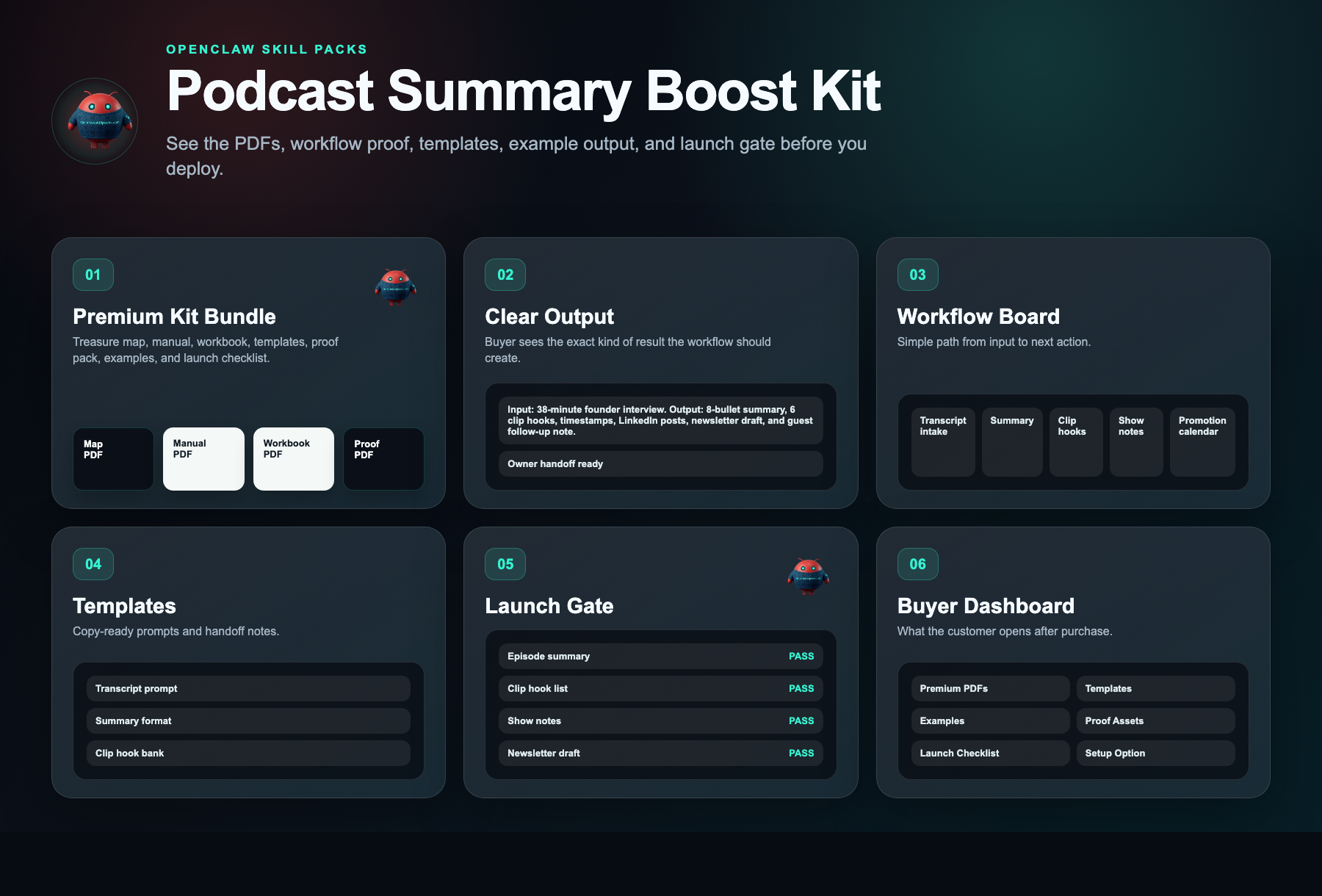
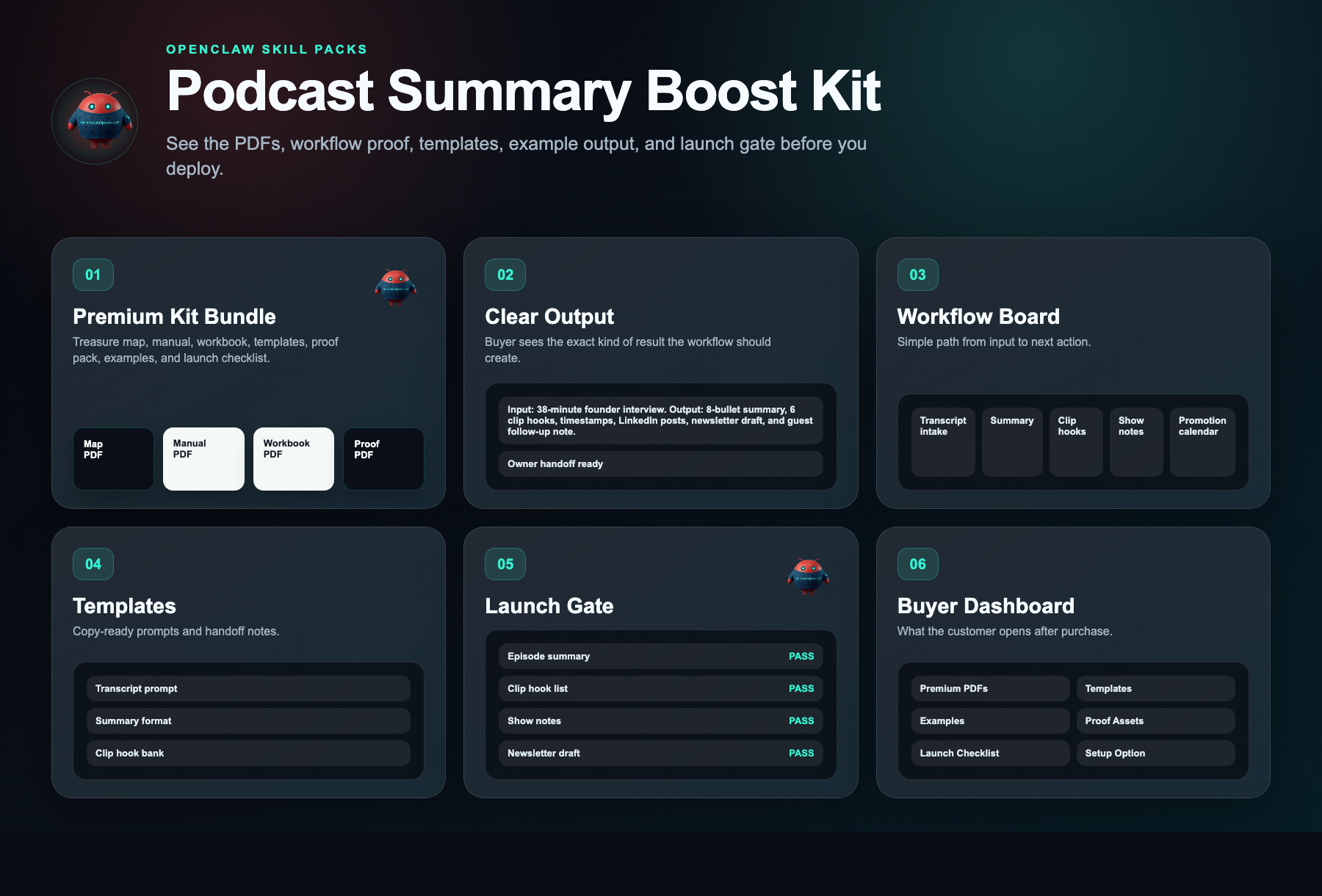
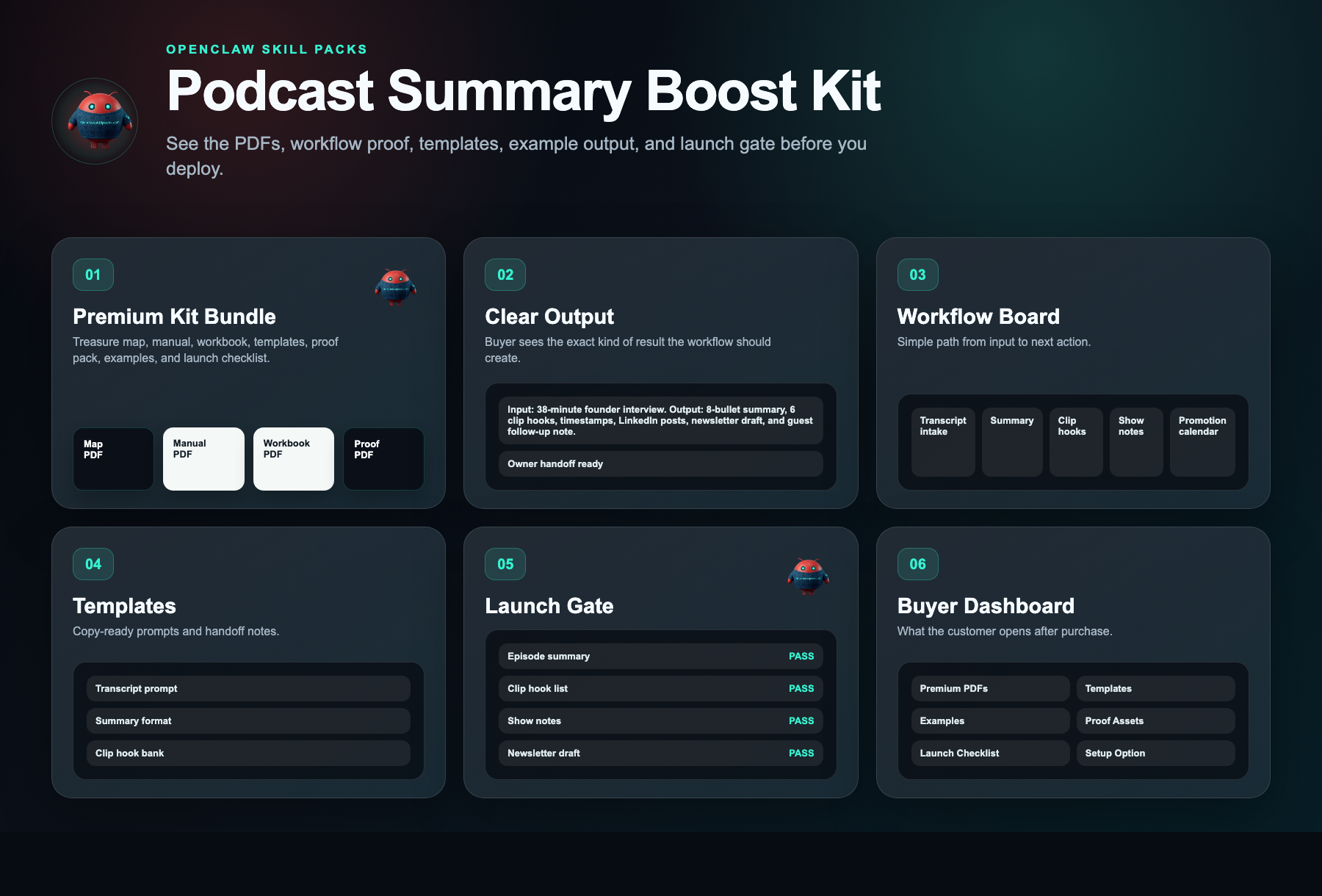
See what is inside.
Every kit helps you start with a clear workflow, simple setup steps, ready-to-use messages, example outputs, and a delivery dashboard.

Kit walkthrough
Watch before you buy.
Watch what you get, what it helps you do, and how to start building it yourself.
Kit walkthrough
Podcast Summary Boost Kit walkthrough
Safety layer
Fleet Shield verifies before you deploy.
Every skill in this kit has been reviewed for credential access, external calls, data handling, and permission scope. You see the safety notes before you install.
Who this is for
- Solo podcasters publishing weekly who need to maximize content output without adding team members
- Podcast agencies managing 3+ client shows who need a repeatable, white-label production workflow
- Creator-educators monetizing through courses or coaching who use podcasting for leads but lack a structured promotion system
Not the right fit
- Hosts looking for fully done-for-you editing and ghostwriting rather than a DIY system
- Creators who have not yet published their first episode and have no existing content to repurpose
Free building blocks
Inspect the ingredients before you buy the recipe.
These skills remain free to inspect. The paid kit shows how to connect, configure, test, and launch them as one working workflow.
AI Generated YouTube Chapter Marks
Free scorecard liveTurns long-form content into structured moments.
Setup requirement
Transcript, episode title, guest details, and review owner.
Evidence asset needed
Chapter marks and summary output.
Free vs paid
Skills are free. The kit is paid.
Free in OpenClaw
- Skill scorecards
- Findings summaries
- Source visibility
- Fleet Shield notes
- Inspect building blocks
$297 DIY Kit
- 30-minute start guide
- Setup manual
- Fill-in workbook
- Scripts and templates
- Evidence and resale guide
- Workflow map
Premium Setup $497+
- Help setting it up
- Setup for your business
- Connect the handoff
- Help with test runs
- Launch support
Delivery checklist
What happens after purchase
You receive the self-serve deployment kit.
The free skills are still free. The kit is the implementation path that turns them into a working business workflow.
- 1.30-minute start guide PDF
- 2.Setup manual PDF
- 3.Workbook PDF
- 4.Scripts and templates PDF
- 5.Evidence and resale PDF
- 6.Automation files
Need the right fit first?
Tell us what you want AI to fix. We’ll show you the AI agent that can help.
Takes 30 seconds. No spam.
FAQ
What am I paying for?
You pay for the system that helps you put the free skill notes to work. The kit gives you the setup order, workflow map, ready-to-use messages, examples, tests, and launch checklist for a plug-and-play repurposing system that turns one podcast episode into 20+ platform-ready assets—short-form clips, seo show notes, email newsletters, and a 14-day social promotion calendar—to triple episode reach without hiring an editor..
Are the skills free?
Yes. Skill notes are free to view. The paid kit shows how to use them together for one business job.
Why is the kit $297 if the skills are free?
Because the value is the working path: what to use, what order to use it in, what messages to copy, where the lead goes, and how to test it.
Can I build it myself using only the free skills?
Yes, if you want to work it out yourself. The kit is for buyers who want the short path: files, examples, tests, and launch steps in one place.
What if I want help installing it?
Premium setup starts at $497. That is for buyers who want help configuring the workflow around their business, handoff destination, and launch requirements.
Does it actually work?
One episode becomes thirty days of content without hiring help. You extract more value from time already spent, and you avoid extra payroll costs.
Will it work for my business?
If you record episodes, this works. It repurposes any topic into clips, notes, and emails that keep attracting listeners without paid ads or extra hours.
What exactly do I get?
A system that turns one episode into summaries, clips, show notes, newsletters, and a 30-day promo calendar. It saves hours and requires no extra software.