DIY system kit
Build your Content Engine AI Employee.
Built for creators, agencies, and operators who need one idea turned into usable content assets without rebuilding the process every week.
This page shows the job, the evidence, and the next step. Buy the DIY kit or ask us to set it up.

Matched job
Content Engine AI Employee
Job it does
Idea intake, scripts, captions, repurposing, and publishing calendar support
Demo Package Listed
Ready for customers to inspect and buy.
This product has a working demo or recorded workflow asset, a customer-ready delivery package, and checkout enabled after review.
25
Files
5
PDFs
0
DOCX
0
XLSX
- Generated content calendar
- Video/chapter example
- Caption pack screenshot
- Publishing checklist
Safety target
Target score before production: 80+ with clear media, external-call, and publishing review notes.
Content growth agent
See one idea become scripts, captions, posts, and a publishing plan.
The demo shows the agent taking a source idea and turning it into a usable content batch with review points instead of vague prompt output.
The money path
Watch the working agent first. If you want the files, buy the DIY kit for $297. If you want the result, have OpenClaw install the working agent around your real tools, routes, and approval rules.
Live voice demo — browser only, no phone
Talk to the AI agent right now in your browser. Click, allow mic access, and hear what your customers would experience.
Try Live Voice DemoMatched evidence video
Content machine workflow demo
Watch what you get, how one idea becomes useful content, and how to start building it yourself.
Want this working in your business instead of another file pack? Use the install button and we build the agent path for you.
Agent for this kit
Content Repurposing Agent
We install the content intake, brand rules, review queue, publishing calendar, and approval checkpoints.
Step 1
Input one idea
Start from a product, topic, transcript, or short note.
Step 2
Agent builds the batch
It creates hooks, scripts, captions, and platform-specific assets.
Step 3
Owner approves the plan
Nothing publishes blindly; the install path adds brand and approval rules.
Fit check
Do not buy a random kit.See the job first.
This kit helps you build the Content + Video Growth Kit. Want us to set it up? Use the setup path. Want to build it yourself? Use the kit.
Content Engine AI Employee
Idea intake, scripts, captions, repurposing, and publishing calendar support
What it does
- Turns one topic or offer into scripts, captions, and post angles
- Repurposes long-form content into short-form assets
- Builds a publish-ready calendar and review queue
- Keeps brand review and proof steps in the workflow
Evidence to check
- Script and caption examples
- Publishing calendar
- Repurposing map
- Brand review checklist
Fit questions
The problem
You do not need more tools.You need one clear fix.
The solution
A plug-and-play content repurposing system (templates, SOPs, and scheduling frameworks) that converts one weekly long-form video into 20+ platform-native assets—short-form clips, carousel posts, and email nurture sequences—plus a 30-day content calendar, completing 30 days of scheduled omnichannel content in under 3 hours per batch
Clear result
A plug-and-play content repurposing system (templates, SOPs, and scheduling frameworks) that converts one weekly long-form video into 20+ platform-native assets—short-form clips, carousel posts, and email nurture sequences—plus a 30-day content calendar, completing 30 days of scheduled omnichannel content in under 3 hours per batch
Setup time
60-120 minutes for self-serve; 2-5 business days with premium setup.
Exact output
Input: Jenna’s Austin pet groomer posts her golden retriever bath routine → Output: 30-day kit with 10 TikTok scripts, 12 Instagram captions, 8 local hashtag sets, and a Tuesday/Thursday 10am publish calendar starting May 1.
Package contents
Everything inside the kit.
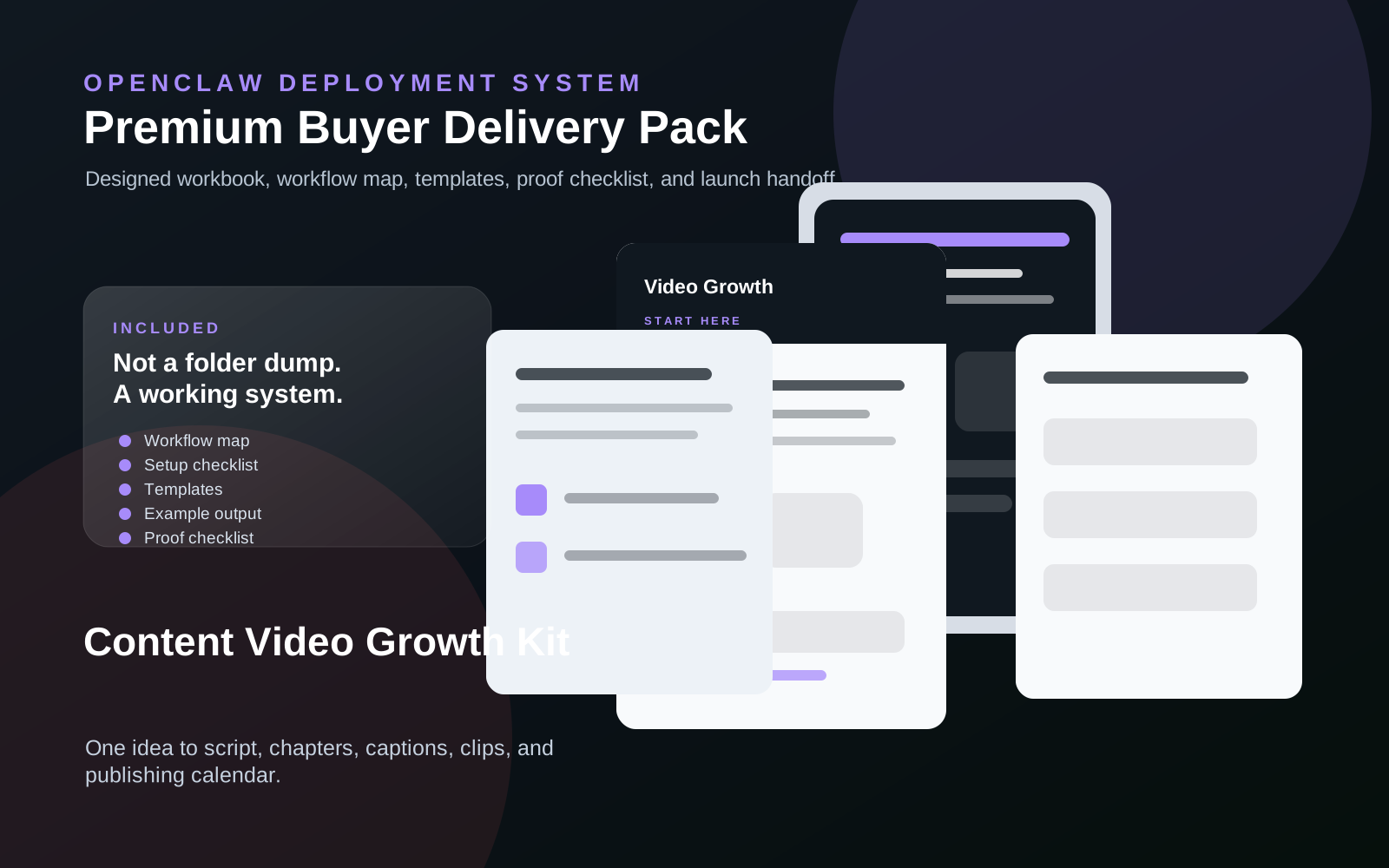
No messy dump. You get clear files, a start guide, the builder-agent prompt, and the next steps.
content-video-growth-kit.zip
25 files · 5 PDFs · 0 DOCX · 0 XLSX
Open first
00-START-HERE.md
Start Here
Open this first. It shows what to do now, what to do next, what prompt to give your builder agent, and what done looks like.
Agent-build prompt included
Paste 09-AGENT-BUILD-PROMPT.md into your AI builder so it asks for the right business inputs, builds in no-send mode, saves evidence, and blocks live sends or writes until approved.
No clutter guarantee
No internal notes or mystery files. Each file is labeled and ready to use.
Marketplace-ready images
9 approved images are included for your listing, pitch deck, or resale page.
What runs
What runs inside this kit.
These are the ingredients. The kit is the recipe that connects them into one workflow.
Setup steps
From inspection to launch.
Open the kit and input your one core idea to instantly generate your complete 30-day content foundation
Customize the auto-generated video scripts, posts, and captions so every piece sounds exactly like your brand
Arrange your finalized content into the 30-day publish calendar to lock in your daily posting schedule
Batch-shoot your videos using the included shot lists and hook templates, then save your ready-to-post files
Publish your first post today and activate the calendar to transform 30 days of consistent content into measurable audience growth
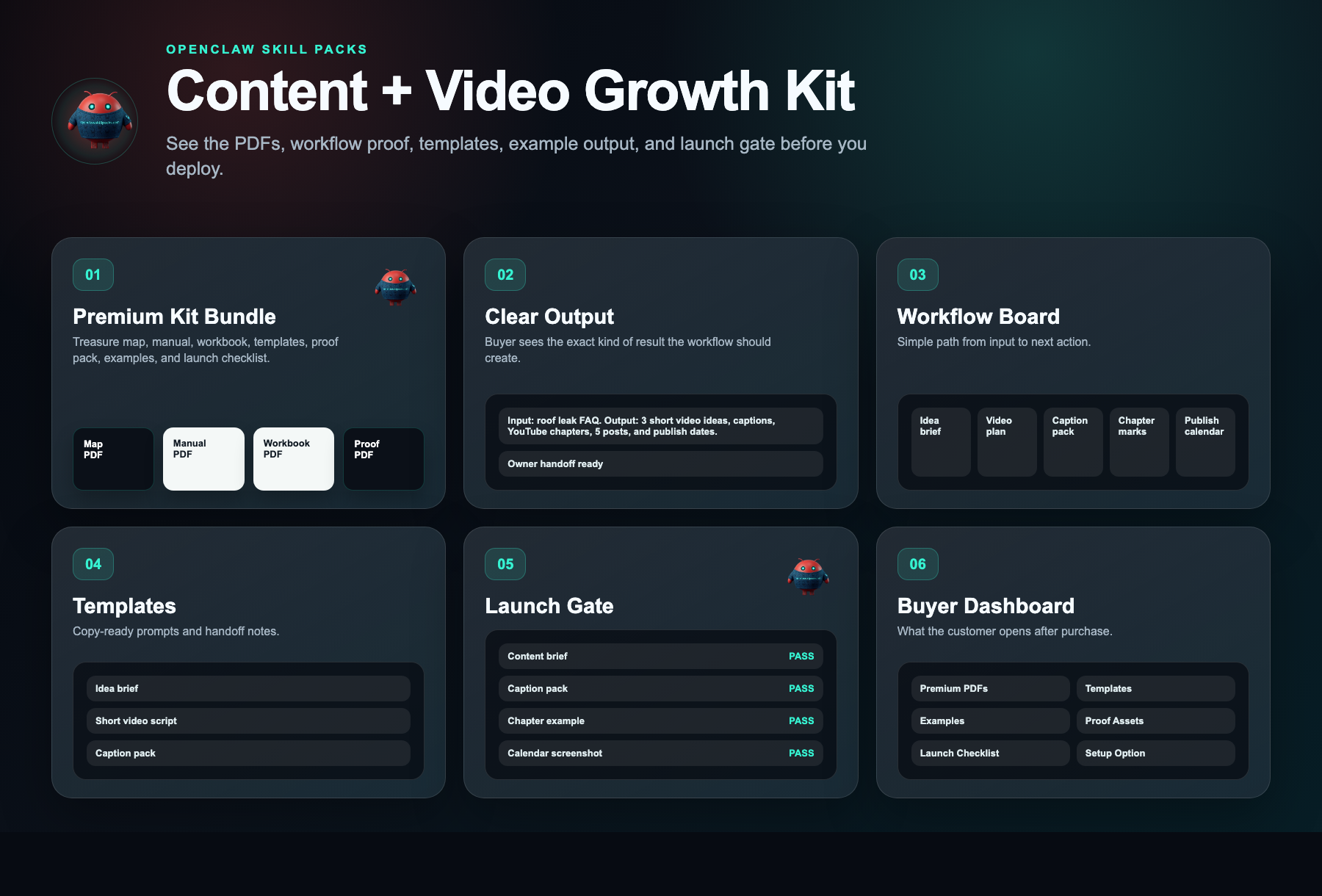
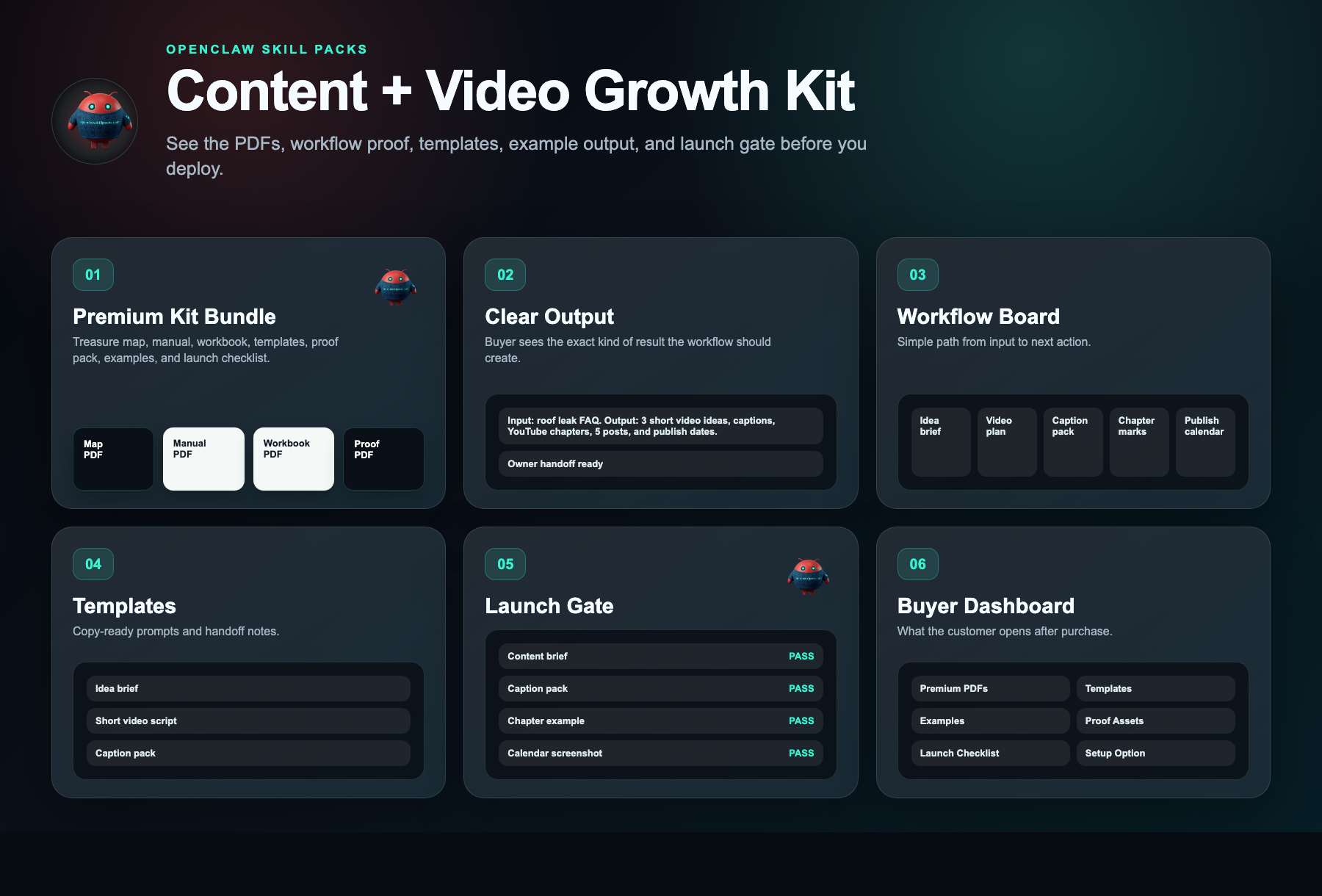
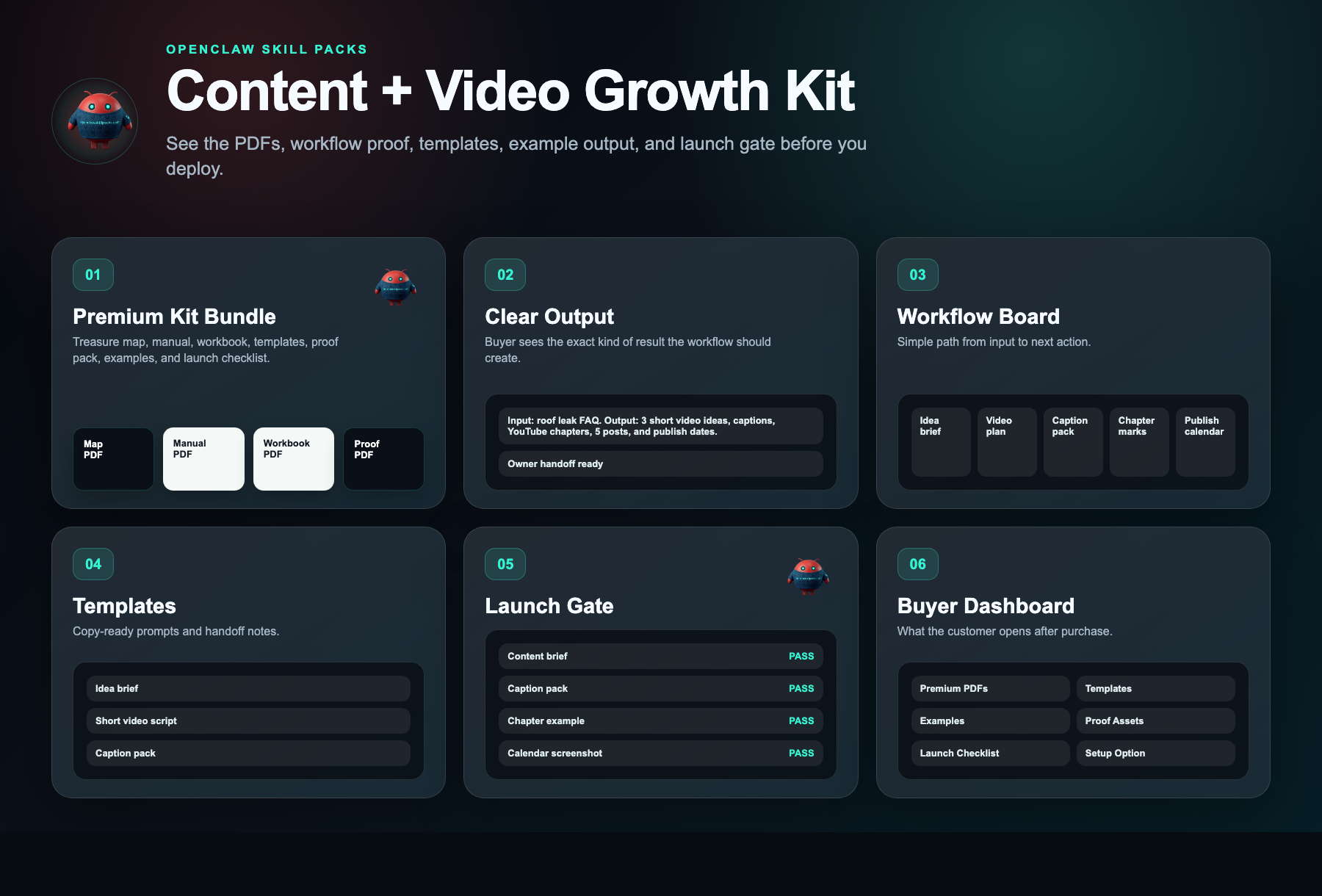
Document preview
See what is inside.
Every kit helps you start with a clear workflow, simple setup steps, ready-to-use messages, example outputs, and a delivery dashboard.
Evidence status
Watch before you buy.
Watch what you get, how one idea becomes useful content, and how to start building it yourself.
Evidence walkthrough
Content machine workflow demo
Safety layer
Fleet Shield verifies before you deploy.
Every skill in this kit has been reviewed for credential access, external calls, data handling, and permission scope. You see the safety notes before you install.
Who this is for
- Coaches, creators, and educators who already film long-form video weekly but lose leads because they lack a system to repurpose it into short-form clips, carousels, and emails
- Agencies and freelancers managing organic content for 2–5 local business clients who need a repeatable, white-label workflow to produce a full month of assets from a single client interview
- Local owner-operators in high-trust industries (real estate, fitness, home services, professional services) who rely on personal brand for inbound leads and can commit one 2-hour block per week to content batching
Not the right fit
- Anyone expecting fully done-for-you filming, editing, or account management without doing the recording, copy-pasting, and scheduling work themselves
- Businesses seeking paid advertising funnels, viral growth hacks, or SEO blogging systems rather than an organic video-to-content repurposing workflow
Free building blocks
Inspect the ingredients before you buy the recipe.
These skills remain free to inspect. The paid kit shows how to connect, configure, test, and launch them as one working workflow.
OpenClaw Content Workflow
Source-visible proof pathTurns raw ideas into sequenced assets with human review before publishing.
Setup requirement
Content pillars, templates, asset folder, and approval owner.
Evidence asset needed
Content batch, captions, and calendar screenshot.
Free vs paid
Skills are free. The kit is paid.
Free in OpenClaw
- Skill scorecards
- Findings summaries
- Source visibility
- Fleet Shield notes
- Inspect building blocks
$297 DIY Kit
- 30-minute start guide
- Setup manual
- Fill-in workbook
- Scripts and templates
- Evidence and resale guide
- Workflow map
Premium Setup $497+
- Help setting it up
- Setup for your business
- Connect the handoff
- Help with test runs
- Launch support
Delivery checklist
What happens after purchase
You receive the self-serve deployment kit.
The free skills are still free. The kit is the implementation path that turns them into a working business workflow.
- 1.30-minute start guide PDF
- 2.Setup manual PDF
- 3.Workbook PDF
- 4.Scripts and templates PDF
- 5.Evidence and resale PDF
- 6.Automation files
Need the right fit first?
Tell us what you want AI to fix. We’ll show you the AI agent that can help.
Takes 30 seconds. No spam.
FAQ
What am I paying for?
You pay for the system that helps you put the free skill notes to work. The kit gives you the setup order, workflow map, ready-to-use messages, examples, tests, and launch checklist for a plug-and-play content repurposing system (templates, sops, and scheduling frameworks) that converts one weekly long-form video into 20+ platform-native assets—short-form clips, carousel posts, and email nurture sequences—plus a 30-day content calendar, completing 30 days of scheduled omnichannel content in under 3 hours per batch.
Are the skills free?
Yes. Skill notes are free to view. The paid kit shows how to use them together for one business job.
Why is the kit $297 if the skills are free?
Because the value is the working path: what to use, what order to use it in, what messages to copy, where the lead goes, and how to test it.
Can I build it myself using only the free skills?
Yes, if you want to work it out yourself. The kit is for buyers who want the short path: files, examples, tests, and launch steps in one place.
What if I want help installing it?
Premium setup starts at $497. That is for buyers who want help configuring the workflow around their business, handoff destination, and launch requirements.
Does this actually work, or will I still waste hours on content nobody sees?
Yes. One idea becomes 30 days of content, so you stop wasting hours writing from scratch and start showing up daily where your customers already scroll.
Will this work for my specific business or niche?
If you sell something people search for or follow, yes. It turns one core message into a month of posts and videos that drive traffic without extra hires.
What exactly do I get?
You get a 30-day publish calendar, video scripts, captions, and posts—all from one idea. No more daily brainstorming; just follow the plan and publish.