OpenClaw kit
Lost tasks burn hours and kill profit.
Deploy in one afternoon. Save 10 hours weekly. Stop revenue leaks from missed deadlines and ownerless tasks.
This page shows the job, the evidence, and the next step. Buy the DIY kit or ask us to set it up.

Kit preview
Task Reminder Automation Kit
Demo Package Listed
Ready for customers to inspect and buy.
This product has a working demo or recorded workflow asset, a customer-ready delivery package, and checkout enabled after review.
27
Files
5
PDFs
0
DOCX
0
XLSX
- Captured task
- Reminder preview
- Overdue alert
- Completion log
Safety target
Target score before production: 85+ with clean source handling, human review, proof assets, rollback/failure handling, and no unsupported claims.
Reminder and escalation agent
See tasks captured, assigned, reminded, and escalated.
The demo path shows how loose tasks become owner assignments, reminder cadence, overdue escalation, and weekly reporting.
The money path
Watch the working agent first. If you want the files, buy the DIY kit for $297. If you want the result, have OpenClaw install the working agent around your real tools, routes, and approval rules.
Matched evidence video
Task Reminder Automation Kit walkthrough
Watch what you get, what it helps you do, and how to start building it yourself.
Want this working in your business instead of another file pack? Use the install button and we build the agent path for you.
Agent for this kit
Task Reminder Agent
We install task capture, owner assignment, reminder rules, escalation policy, and weekly report destination.
Step 1
Task gets captured
The agent receives a request, meeting note, or manual task.
Step 2
Reminder rules apply
Owner, due date, and escalation rules are assigned.
Step 3
The week gets reported
The owner sees completed, overdue, blocked, and next-up work.
The problem
You do not need more tools.You need one clear fix.
The solution
A plug-and-play DIY automation kit that installs a self-managing recurring task system—auto-capturing work, locking in owners, sending tiered reminders, escalating overdue items, and publishing weekly completion scorecards—to enforce 100% on-time execution and eliminate 10+ hours of manual chasing per week.
Clear result
A plug-and-play DIY automation kit that installs a self-managing recurring task system—auto-capturing work, locking in owners, sending tiered reminders, escalating overdue items, and publishing weekly completion scorecards—to enforce 100% on-time execution and eliminate 10+ hours of manual chasing per week.
Setup time
60-120 minutes self-serve; 2-5 business days with premium setup.
Exact output
Input: POST /api/tasks { "action": "assign_task", "title": "Q3 Compliance Report", "assignee": "alex@company.com", "deadline": "2024-11-15T17:00:00Z", "priority": "High", "reminders": ["2_days_before", "4_hours_before", "30_minutes_before"], "escalation": { "if_overdue": "1_hour", "escalate_to": "manager@company.com", "auto_reassign_after": "4_hours" } } Output: { "status": "assigned", "task_id": "TSK-2024-0892", "assignment": { "to": "alex@company.com", "deadline": "2024-11-15T17:00:00Z" }, "reminders_scheduled": [ {"type": "email", "when": "2024-11-13T17:00:00Z", "message": "Reminder: Q3 Compliance Report due in 2 days"}, {"type": "slack_dm", "when": "2024-11-15T13:00:00Z", "message": "4 hours left to submit Q3 Compliance Report"}, {"type": "in_app_alert", "when": "2024-11-15T16:30:00Z", "message": "Due in 30 minutes!"} ], "escalation_chain": [ {"trigger": "overdue_1h", "action": "notify_manager", "target": "manager@company.com"}, {"trigger": "overdue_4h", "action": "auto_reassign", "pool": "backup_analysts"} ], "reporting": { "dashboard_url": "/reports/tasks/TSK-2024-0892", "metrics_logged": ["assignment_time", "expected_response_time", "risk_score"], "summary": "Task assigned with 3 reminders, 2-step escalation, and real-time tracking enabled." } }
Package contents
Everything inside the kit.
No messy dump. You get clear files, a start guide, the builder-agent prompt, and the next steps.
task-reminder-automation.zip
27 files · 5 PDFs · 0 DOCX · 0 XLSX
Open first
00-START-HERE.md
Start Here
Open this first. It shows what to do now, what to do next, what prompt to give your builder agent, and what done looks like.
Agent-build prompt included
Paste 09-AGENT-BUILD-PROMPT.md into your AI builder so it asks for the right business inputs, builds in no-send mode, saves evidence, and blocks live sends or writes until approved.
No clutter guarantee
No internal notes or mystery files. Each file is labeled and ready to use.
Marketplace-ready images
9 approved images are included for your listing, pitch deck, or resale page.
What runs
What runs inside this kit.
These are the ingredients. The kit is the recipe that connects them into one workflow.
Setup steps
From inspection to launch.
Open the kit and integrate it directly with your current task or project management platform
Configure assignment rules so every new task automatically routes to the correct team member based on type or priority
Set reminder intervals and escalation triggers so overdue items instantly alert the next-level owner without manual checks
Turn on the live reporting dashboard to auto-capture completion rates, delays, and team bandwidth across your operation
Launch the automation and get results as tasks move from assignment to closure with zero manual follow-up
Document preview
See what is inside.
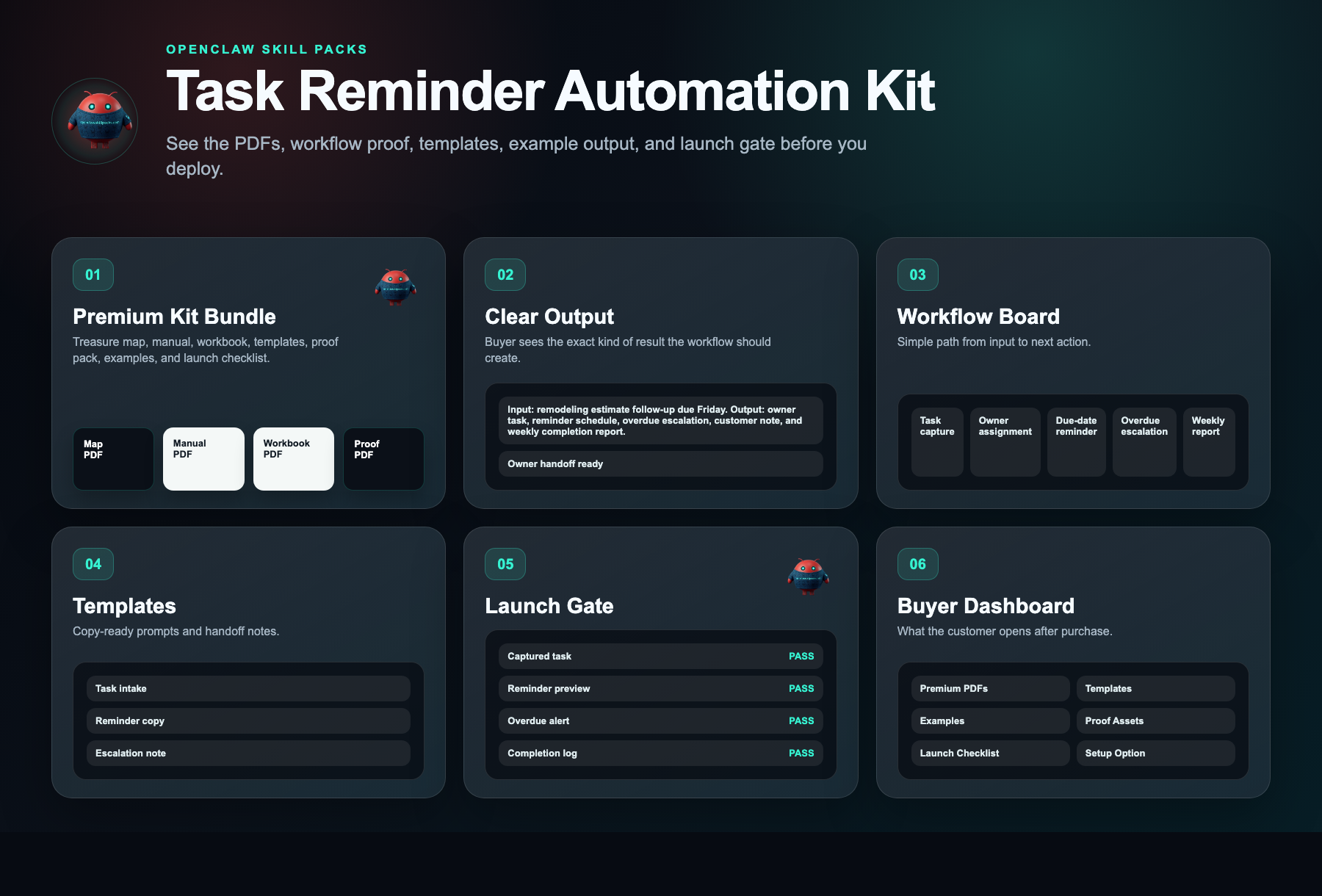
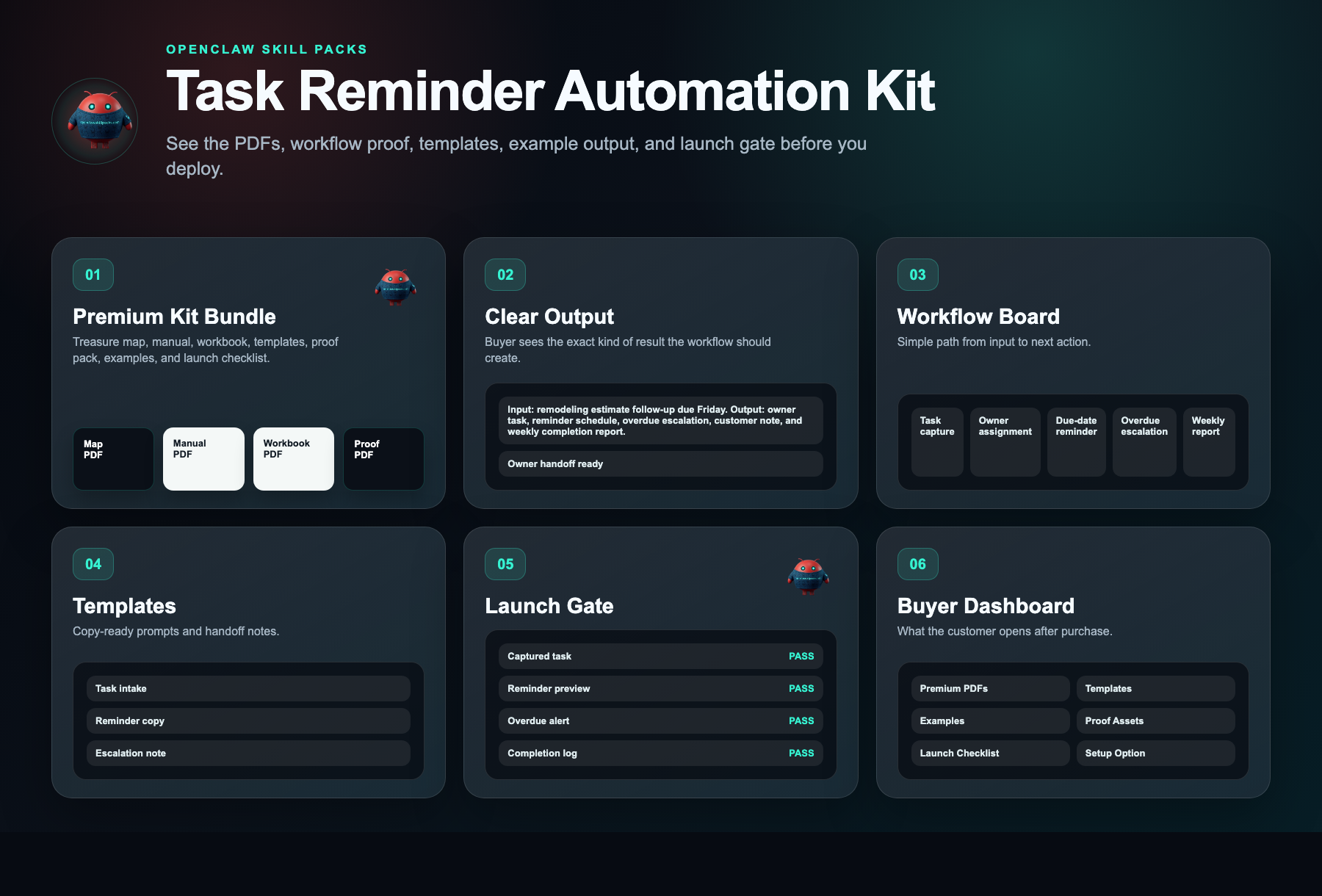
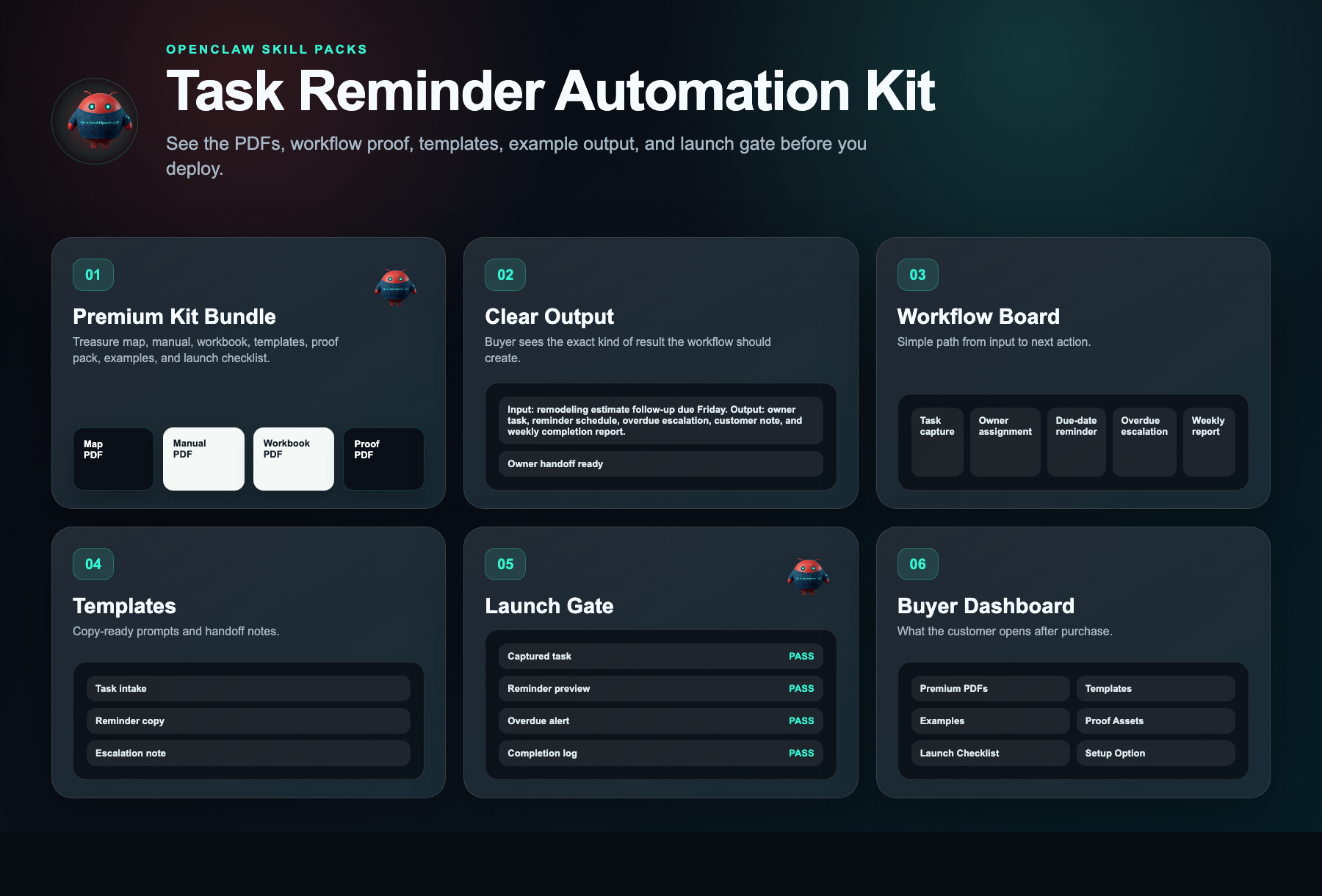
Every kit helps you start with a clear workflow, simple setup steps, ready-to-use messages, example outputs, and a delivery dashboard.

Kit walkthrough
Watch before you buy.
Watch what you get, what it helps you do, and how to start building it yourself.
Kit walkthrough
Task Reminder Automation Kit walkthrough
Safety layer
Fleet Shield verifies before you deploy.
Every skill in this kit has been reviewed for credential access, external calls, data handling, and permission scope. You see the safety notes before you install.
Who this is for
- Operations managers at 10-100 person service companies running recurring SOPs, client deliverables, or compliance checks who currently lose tasks across email and spreadsheets
- Agency owners or client success leads managing 5+ remote team members who need to prove client accountability without daily micromanagement or standups
- Owner-operators in trades, logistics, or property management who personally chase 20+ recurring weekly jobs and need the system to enforce team compliance without their involvement
Not the right fit
- Teams needing a full project management platform with Gantt charts, resource planning, or complex project tracking—this is a recurring-task automation layer, not a PM suite
- Solopreneurs with no staff, businesses without recurring weekly or monthly SOPs, and buyers expecting done-for-you setup, custom workflow development, or 1:1 implementation support
Free building blocks
Inspect the ingredients before you buy the recipe.
These skills remain free to inspect. The paid kit shows how to connect, configure, test, and launch them as one working workflow.
Lead Notifier
Free scorecard livePushes next-action reminders to the right person.
Setup requirement
Notification channel, owner fields, and escalation timing.
Evidence asset needed
Reminder and overdue alert screenshot.
Free vs paid
Skills are free. The kit is paid.
Free in OpenClaw
- Skill scorecards
- Findings summaries
- Source visibility
- Fleet Shield notes
- Inspect building blocks
$297 DIY Kit
- 30-minute start guide
- Setup manual
- Fill-in workbook
- Scripts and templates
- Evidence and resale guide
- Workflow map
Premium Setup $497+
- Help setting it up
- Setup for your business
- Connect the handoff
- Help with test runs
- Launch support
Delivery checklist
What happens after purchase
You receive the self-serve deployment kit.
The free skills are still free. The kit is the implementation path that turns them into a working business workflow.
- 1.30-minute start guide PDF
- 2.Setup manual PDF
- 3.Workbook PDF
- 4.Scripts and templates PDF
- 5.Evidence and resale PDF
- 6.Automation files
Need the right fit first?
Tell us what you want AI to fix. We’ll show you the AI agent that can help.
Takes 30 seconds. No spam.
FAQ
What am I paying for?
You pay for the system that helps you put the free skill notes to work. The kit gives you the setup order, workflow map, ready-to-use messages, examples, tests, and launch checklist for a plug-and-play diy automation kit that installs a self-managing recurring task system—auto-capturing work, locking in owners, sending tiered reminders, escalating overdue items, and publishing weekly completion scorecards—to enforce 100% on-time execution and eliminate 10+ hours of manual chasing per week..
Are the skills free?
Yes. Skill notes are free to view. The paid kit shows how to use them together for one business job.
Why is the kit $297 if the skills are free?
Because the value is the working path: what to use, what order to use it in, what messages to copy, where the lead goes, and how to test it.
Can I build it myself using only the free skills?
Yes, if you want to work it out yourself. The kit is for buyers who want the short path: files, examples, tests, and launch steps in one place.
What if I want help installing it?
Premium setup starts at $497. That is for buyers who want help configuring the workflow around their business, handoff destination, and launch requirements.
Does it actually work?
Yes. Businesses using this kit stop losing billable hours to forgotten follow-ups. Tasks are tracked automatically, so deadlines are met and revenue isn't left on the table.
Will it work for my business?
If you run on tasks, deadlines, and client follow-ups, it works. The kit adapts to your workflow, saving admin time and preventing costly missed commitments.
What exactly do I get?
You get ready-to-deploy automation templates for assignment, reminders, escalation, and reporting. Install them in one afternoon and immediately reduce time spent chasing tasks.